Handling Loaner iPads
If you have been directed to this page, you will be using a CaseTrain iPad for your iPad exam.
Unfortunately, for staffing, organizational, and technical reasons, it is not possible to clean
or reset these iPads between exams. We therefore rely on your cooperation to ensure that the
next test-taker can use "your" iPad without any problems.
Correct Accessories
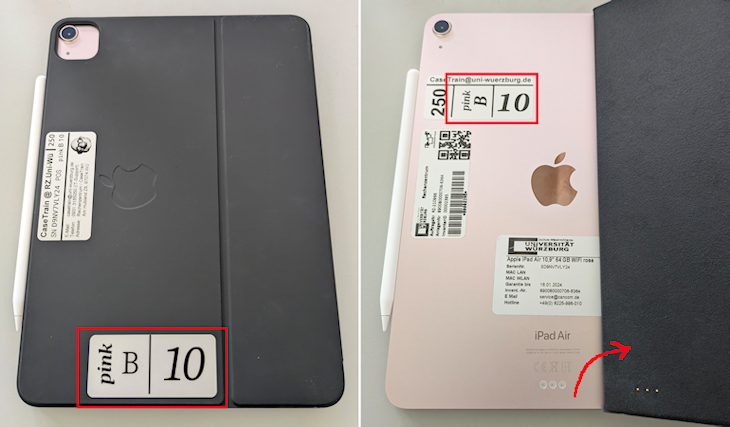
Be sure to check immediately whether the correct Apple Pencil and the correct case/keyboard are attached to the iPad. The engraving on the pencil must match the top line of text on the nearest sticker on the case — the iPad’s number (e.g., "pink B 10") has nothing to do with the number on the pencil (e.g., "250"). On the iPad itself, this three-digit number can also be seen on the nearest sticker:
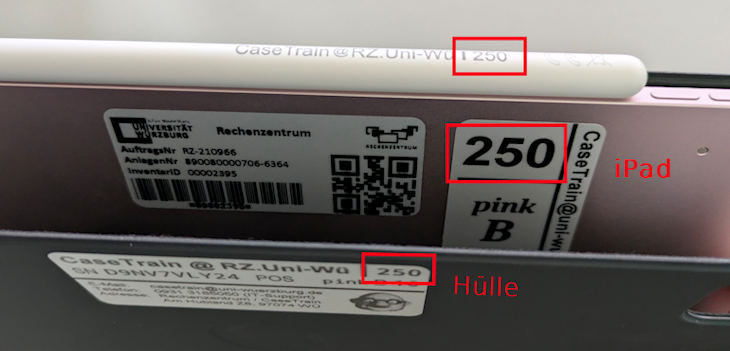
If the wrong pencil or case is attached, please report this immediately to the exam proctor. When returning the iPad, please make sure to attach your pencil in the center with the tip pointing toward the charging port.
If you receive an iPad with the pencil not centered, it is likely not (fully) charged. Attach it correctly so that it can charge in the few minutes remaining before the exam begins.
Hygiene Rules
- If you need to eat or drink something during the exam, please make absolutely sure that no crumbs or liquid land on the keyboard or the iPad. Please also keep your fingers clean while eating.
- DO NOT put the pencil in your mouth, and DO NOT run it through your hair.
- Before returning the iPad, please remove as much dirt as possible from it. Wipe it down with a (personal) tissue or the back of your hand, or blow it dry. DO NOT shake the iPad or tap it on the table.
Placing the iPad flat on the desk
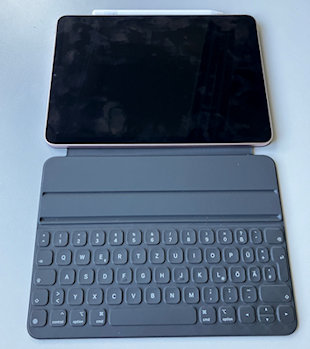
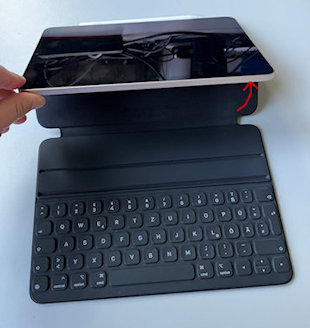
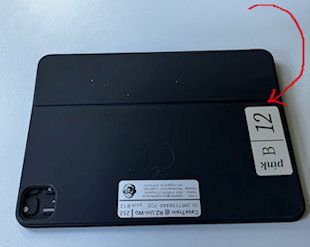
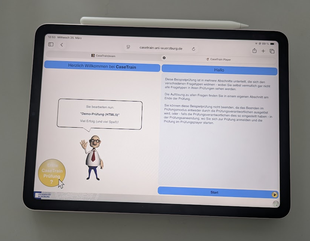
If you do not need the keyboard (e.g., if the exam consists only of multiple-choice questions) or if the exam proctor asks you to place the iPads flat on the table, DO NOT place the iPad on the table with the keyboard open. Instead, remove the case/keyboard and place the iPad ON top of the keyboard/case. This way, the case prevents the iPad from sliding off the table!
 |
⇨ |  |
| ⇩ | ||
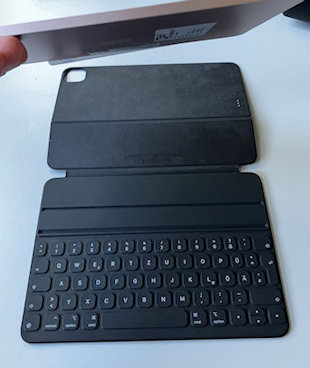
When reattaching the keyboard, make sure the camera module fits into the designated recess: 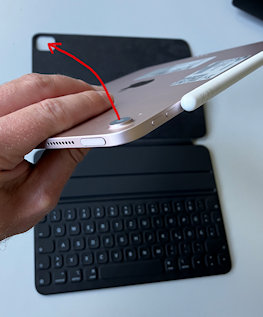 |
⇨ |  |
| ⇩ | ||
 |
||
If you’re unsure which keyboard belongs to your iPad while attaching it (e.g., because you and the person sitting next to you both removed your keyboards and placed them together), you’ll find a sticker on the back of the iPad that matches the keyboard:
Changing Settings
You can change some settings for the duration of the exam.
However, you must reset them before returning the iPad.
If you change the language in order to make the necessary settings, you must also reset the language.
Under no circumstances should you change the other settings (highlighted in bold below).
Some settings can be found in Quick Settings (Control Center), which you can access by swiping down
from the top-right corner. The remaining settings can be found via the gear icon.
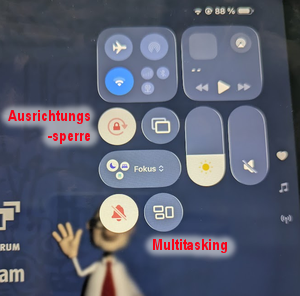
Control Center
- Brightness: [25%-50%]
- Volume: 0%
- Wi-Fi: AN
- Airplane Mode: AUS
- Bluetooth: AUS
- Orientation Lock: [AN]
- Multitasking: AUS
- No Notifications: AN
Settings (Gear Icon)
Only the following settings may be changed:
- Display & Brightness
- Appearance: [Hell]
- Text Size: [Mitte]
- Bold Text: [AUS]
- True Tone: [AN]
- Auto-Lock: [2 Minuten]
- Lock/Unlock: [AN]
- Accessibility → Display & Text Size
- Bold Text: [AUS]
- Larger Text: [AUS]
- Reduce Transparency: [AUS]
- Increase Contrast: [AUS]
- Distinguish Without Colors: [AUS]
- Invert - Smart: [AUS]
- Invert - Classic: [AUS]
- Color Filter: [AUS]
- Reduce White Point: [AUS]
- Auto-Brightness: [AN]
Return
Before returning the iPad, be sure to log out of the exam app—otherwise, the next test-taker will be able to
see your name and matriculation number!
Afterward, be sure to close all tabs. You’ll be grateful to the test-taker who used the iPad
before you if they did the same after their exam.
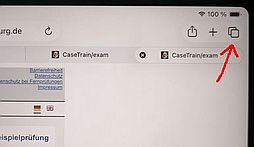
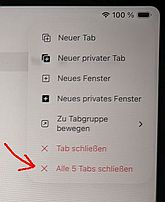
- Press and hold the tabs icon in the upper-right corner until a menu appears
- Select the bottom option ("Close all ... tabs")
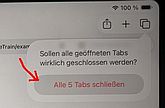
- Confirm the prompt
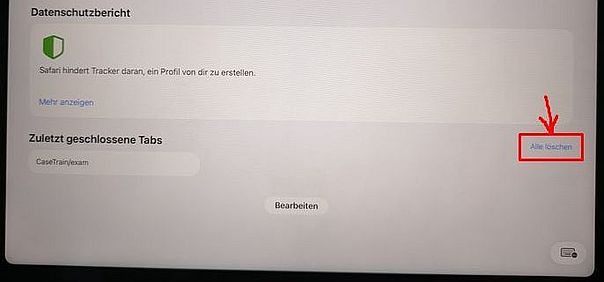
- Then, under "Recently Closed Tabs", tap "Clear All" on the right
Note
"Anyone who significantly disrupts data processing that is of essential importance to another person by [...]
damaging, rendering inoperable, [...] or altering a data processing system [...] shall be punished. If the data
processing is of essential importance to [...] a government agency, the penalty is imprisonment for up to five
years or a fine. An attempt to commit this offense is punishable.”
The above is a not legally binding translation of:
"Wer eine Datenverarbeitung, die für einen anderen von wesentlicher Bedeutung ist, dadurch erheblich
stört, dass er [...] eine Datenverarbeitungsanlage [...] beschädigt, unbrauchbar macht, [...] oder verändert,
wird [...] bestraft. Handelt es sich um eine Datenverarbeitung, die für [...] eine Behörde von wesentlicher Bedeutung
ist, ist die Strafe Freiheitsstrafe bis zu fünf Jahren oder Geldstrafe. Der Versuch ist strafbar."
StGB § 303b